
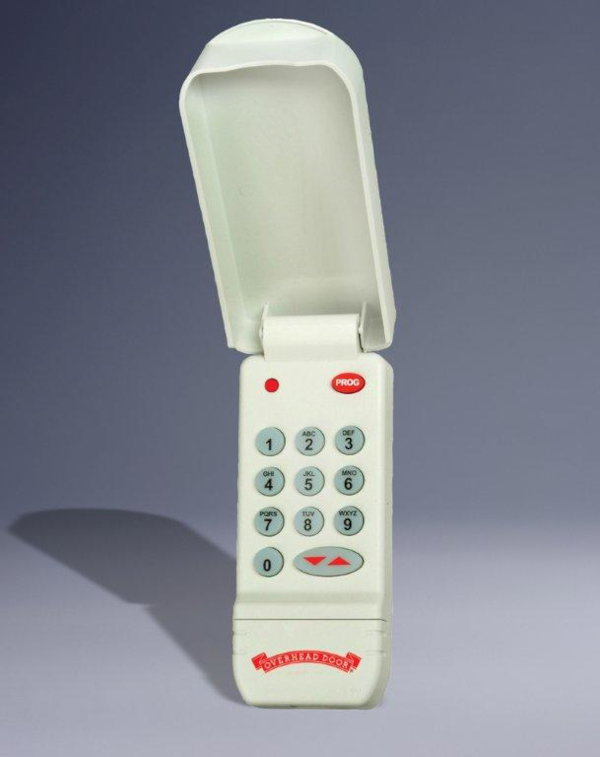
Managing garage keypad access between rental stays is an important part of preparing a vacation property for new guests. A keypad makes check-in convenient, but an old code or unreturned remote could leave previous visitors with access after checkout.
To manage garage keypad access between rental stays, review all authorized entry methods, remove or change departing guests’ access, confirm that permanent users still have access, and test the next guest’s code before arrival. Always follow the instructions for your specific keypad and opener, since not every system supports temporary or automatically expiring codes.
For vacation rental owners in Hilton Head, Bluffton, Beaufort, and nearby Lowcountry communities, a consistent turnover routine can help reduce access confusion without requiring unnecessary equipment upgrades.
Overhead Door Company of the Lowcountry provides garage door services, including support for compatible access equipment. Its garage door keypad page is a useful starting point when reviewing your options.
Start by Reviewing Every Way Someone Can Access the Garage
Changing a keypad code does not necessarily remove every way a previous guest could enter the garage.
Depending on your opener and access setup, entry methods may include:
- Exterior keypad: A numeric code entered outside the garage.
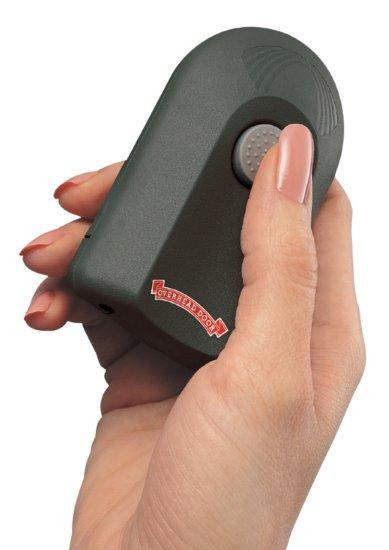
- Handheld remote: A programmed device used to operate the opener.
- Vehicle controls: A garage door control programmed into a guest’s vehicle.
- Smart garage app: An authorized account or connected access feature.
- Owner or staff controls: Access used by cleaners, maintenance providers, and property managers.
Create a private inventory showing which access methods are in use and who is authorized to manage them.
| Access Holder | What to Review |
|---|---|
| Property owner | Confirm continued access and account control |
| Current guest | Provide only the access needed for the stay |
| Previous guest | Confirm access has been removed or changed |
| Cleaning staff | Maintain appropriate access without sharing guest credentials |
| Maintenance provider | Review whether access is still needed |
| Property manager | Confirm responsibility for issuing and revoking access |
Keep actual keypad codes out of public house manuals, shared turnover checklists, and listing descriptions. Assign one authorized person or team to manage changes and record when each turnover task is completed.
Protect the Access Account, Too
If your garage opener uses an online account, protect it separately from the keypad. The Cybersecurity and Infrastructure Security Agency’s guidance on strong passwords recommends using long, unique passwords for online accounts. Enable multifactor authentication where the service offers it.
For a numeric keypad code, follow the device’s requirements and avoid obvious combinations, such as repeated digits or easily guessed dates.
Never share the property’s permanent access credentials through a public listing or unsecured guest instructions.
Check Whether Your Garage Keypad Supports Temporary Guest Codes
Not every garage door keypad offers the same access features. Some compatible systems may support multiple codes or temporary guest access. Others may require the owner to change a shared code manually.
Before promising guests that their code will expire automatically, check the keypad and opener manuals.
Ask these questions:
- Can the system create a separate guest code without changing the owner’s code?
- Can a guest code expire automatically?
- If expiration is supported, is it based on time, number of uses, or another condition?
- Can one guest code be removed without affecting other users?
- Can individual remotes or vehicle-programmed controls be revoked?
- Does the system require an app or internet connection for access management?
- What happens to access settings after a power interruption?
Important: A temporary-code feature available on one opener model may not be available on another.
If your keypad cannot revoke individual guest codes, determine whether changing the shared code after each stay is practical. If it disrupts cleaners or other authorized users, ask about compatible alternatives before replacing the existing equipment.
Create a Garage Keypad Turnover Checklist
A repeatable turnover process can help rental owners and property managers avoid missed access changes. The exact programming steps should always come from the installed equipment’s manual.
Before the Next Guest Checks In
Confirm that the previous guest’s access has ended using the manufacturer’s documented method.
Then:
- Verify the authorized access methods for the next reservation.
- Set up the next guest’s code if the system supports it.
- Keep owner and staff access separate where possible.
- Share guest instructions through the property’s approved private communication channel.
- Provide a contact for access problems.
Avoid placing permanent codes in public guest information.
Immediately After Checkout
Review which access methods were provided during the stay. Remove or change the departing guest’s keypad access as the equipment allows. If a handheld remote was issued, confirm that it has been returned.
A keypad code change may not disable a missing remote or vehicle-programmed control.
If a remote is missing, consult the manufacturer’s instructions or a qualified installer about the appropriate revocation procedure.
Before the Next Arrival
Have an authorized person verify the access setup using the manufacturer-approved procedure.
Check that:
- The new guest’s intended access works.
- Previous guest access has been revoked as supported by the system.
- Owner and staff controls still operate as intended.
- The garage door opens and closes normally.
- Any access problems have been documented.
Record that the checks were completed, but do not put actual codes in the turnover checklist.
What If the Garage Door Keypad Stops Working?
A keypad may stop responding for several reasons, including battery problems, equipment faults, or compatibility issues. Do not assume a specific cause based on a single symptom. Keep an independent, authorized entry arrangement available in case the keypad or power fails.
For routine troubleshooting, note:
- Keypad make and model
- Garage door opener make and model
- Whether the keypad responds
- When the problem began
- Whether other authorized controls still work
- Whether there was a recent change to the access setup
Do not include current access codes in photos or service messages.
Know When It’s a Garage Door Safety Problem
A nonworking keypad and a damaged garage door are different issues.
If the door is crooked, unusually heavy, off track, or has a damaged spring or loose lifting cable, stop using it until a qualified technician has inspected it.
Never adjust springs, cables, bottom brackets, or opener electrical components yourself.
The garage door safety guide from the Door & Access Systems Manufacturers Association explains important precautions around moving doors and tensioned hardware.
For questions about your equipment, review the company’s garage door opener information before discussing compatible replacement or repair options.
Is a Smart Garage Keypad Worth It for a Vacation Rental?
A connected keypad or opener may be worth considering if your property frequently changes guests and the existing system cannot manage access conveniently. However, upgrading is not always necessary. If your current equipment supports separate, revocable guest access and your turnover team can manage it consistently, keeping the existing system may be reasonable.
Consider an upgrade when:
- The current keypad cannot support the access arrangement you need.
- Changing guest codes repeatedly disrupts other authorized users.
- You need supported remote access-management features.
- You want separate account permissions for property staff.
- The existing equipment is unreliable or incompatible with the desired features.
Before buying, confirm the actual capabilities of the proposed model. Do not assume that every smart keypad automatically expires codes, provides access history, or revokes programmed vehicle controls.
How Much Does a Rental Garage Keypad Upgrade Cost?
The cost depends on your current garage door opener, keypad compatibility, selected features, and installation requirements. Some properties may only need a compatible keypad, while others may require additional equipment.
Request a written estimate that separates:
- Keypad or opener equipment
- Installation labor
- Required accessories
- Any electrical or compatibility work
- Optional connected features
- Ongoing account or subscription fees, if applicable
A new smart opener is not automatically the best solution if your existing keypad already provides the access controls you need.
Compare the cost of upgrading with the practical benefit for your rental turnover process.
Frequently Asked Questions
Should Every Vacation Rental Guest Receive the Same Garage Code?
Separate guest codes are generally easier to manage when the system supports them. A shared code may require changing access for everyone after checkout. Check your keypad’s capabilities before choosing a turnover process.
How Do I Change a Garage Keypad Code Between Guests?
Follow the programming instructions for your exact keypad and opener model. Some systems allow individual codes to be removed, while others require changing a shared code. Confirm that authorized users retain access afterward.
Can a Temporary Garage Door Code Expire Automatically?
Some systems support temporary access, but expiration features vary by model. Verify whether the code expires by time, use, or manual removal before relying on it for a rental stay.
Does Changing the Garage Keypad Code Disable Old Remotes?
Not necessarily. Keypads, handheld remotes, vehicle-programmed controls, and app accounts may be managed separately. Check the manufacturer’s instructions to understand how each access method is revoked.
What Should I Do If a Guest Loses the Garage Remote?
Consult the opener manual or installer about revoking the missing device. Confirm that remaining authorized controls still work before the next guest arrives.
Can Cleaning Staff Have a Separate Garage Access Code?
Yes, if the installed system supports separate codes or users. Keep staff access distinct from guest access where possible, limit who knows the credentials, and review permissions when personnel change.
What If the Garage Door Looks Damaged During Guest Turnover?
Stop using the garage door and keep people away from the opening. Do not operate a crooked, unusually heavy, or visibly damaged door. Arrange a qualified inspection before returning it to service.
Make Garage Keypad Access Between Rental Stays Easier in the Lowcountry
A dependable garage keypad turnover process does not need to be complicated. Know which access methods are active, assign responsibility for code changes, verify guest access before arrival, and keep a backup entry plan.
The goal is simple: give current guests the access they need while making sure previous guests no longer have access through the methods you can control.
Overhead Door Company of the Lowcountry serves property owners in Hilton Head, Bluffton, Beaufort, and surrounding Lowcountry communities. If you’re unsure whether your existing keypad supports separate guest codes or need help reviewing compatible opener options, the team can discuss your equipment and available service options.
Call Overhead Door Company of the Lowcountry at (843) 489-3200 or contact the team online to discuss your rental property’s garage keypad setup.
Ask about compatible access equipment and appointment availability before the next guest turnover.