
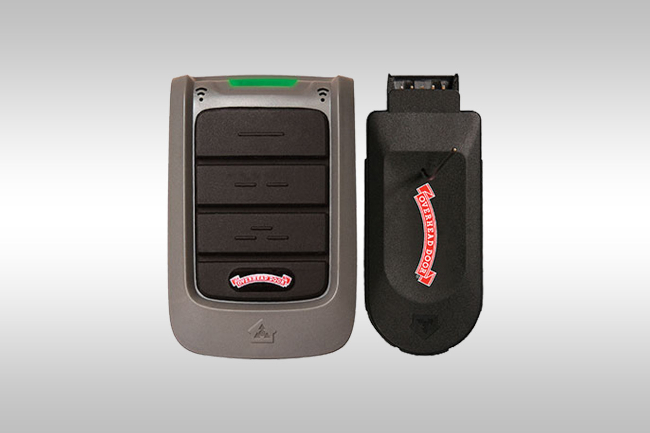
Garage door keypads provide a convenient way to access your garage without needing a remote or key. By entering a secure code, homeowners can open and close their garage door quickly and efficiently. While these systems are designed to be simple to use, programming garage door keypads can seem confusing if you have never done it before.
At a basic level, programming garage door keypads involves syncing the keypad with your garage door opener so both devices communicate correctly. This process is often required when installing a new keypad, replacing batteries, updating a security code, or troubleshooting a system that is no longer responding.
Understanding how garage door keypads work and how to program them correctly can help ensure reliable access, improve security, and prevent unnecessary service calls. This guide explains how the system works, when programming is needed, and how to complete the process step by step.
What Are Garage Door Keypads and How Do They Work?
Garage door keypads are wireless entry devices installed outside the garage that allow users to operate the door by entering a personal identification number. Instead of relying on a handheld remote, the keypad sends a signal directly to the garage door opener when the correct code is entered.
These systems communicate with the opener using radio frequency signals. When a user enters a code and confirms it, the keypad transmits a signal that tells the opener to activate. If the code matches what is stored in the system, the opener responds by opening or closing the garage door.
Garage door keypads are widely used because they offer convenience and added flexibility. Homeowners can grant access to family members, service providers, or guests without needing to provide physical remotes. The ability to update or change codes also allows for better control over who can access the garage.
When You Need to Program a Garage Door Keypad
There are several situations where programming garage door keypads becomes necessary. One of the most common is during the initial installation of a new keypad. When a new device is installed, it must be synced with the opener before it can function properly.
Programming may also be required after replacing the keypad batteries. In some cases, power loss can reset stored settings, requiring the code to be entered again. While not all systems lose programming after a battery change, it is a common reason homeowners revisit the setup process.
Changing the access code is another reason to program the keypad. Updating the code periodically helps maintain security, especially if access has been shared with multiple people over time.
If the keypad stops responding or behaves inconsistently, reprogramming is often one of the first steps in troubleshooting. Resetting the connection between the keypad and opener can resolve communication issues and restore normal operation.
How to Program a Garage Door Keypad Step by Step
Programming garage door keypads typically follows a similar process across most systems, although specific steps may vary depending on the brand. The general method involves using the opener’s learn function and entering a new code into the keypad.
The first step is to locate the learn button on the garage door opener. This button is usually found on the motor unit mounted on the ceiling of the garage. In some cases, it may be behind a light cover or protective panel. The button is often labeled and may be colored to make it easier to identify.
Once the learn button is located, press it to activate programming mode. This step signals the opener that it is ready to accept a new code from the keypad. The system typically remains in this mode for a short period, so the next steps should be completed without delay.
After activating the learn mode, go to the keypad and enter the desired personal identification number. This code should be easy for you to remember but not easily guessed by others. After entering the code, press the confirm or enter button on the keypad to send the signal to the opener.
The opener should respond by confirming that the code has been accepted. This confirmation may come in the form of a light flash, a clicking sound, or movement from the door itself. Once the code is stored, the system is ready for use.
To complete the process, test the keypad by entering the new code and confirming that the garage door opens and closes as expected. If the door responds correctly, the programming process is complete.
Programming Different Types of Garage Door Keypads
While the basic programming process is similar across systems, different types of garage door keypads may have slight variations in setup. Understanding these differences can help ensure a smoother programming experience.
Universal keypads are designed to work with multiple garage door opener brands. These devices often include additional steps to select the correct compatibility setting before programming. Users may need to enter a brand code or follow a specific sequence to match the opener.
Brand specific keypads are built to work with a particular manufacturer’s systems. These devices typically follow a more straightforward process since they are designed for direct compatibility. Programming instructions for these keypads are often more streamlined.
Smart keypads offer additional features such as connectivity to mobile devices or home automation systems. These systems may require pairing through an app or connecting to a wireless network before completing the programming process. While the core function remains the same, the added features provide greater control and flexibility.
Common Problems When Programming Garage Door Keypads
Even though the process is designed to be simple, homeowners may encounter issues when programming garage door keypads. One of the most common problems is a keypad that does not respond after entering a code. This can be caused by weak or dead batteries, signal interference, or incorrect programming steps.
Another issue is entering a code that is not accepted by the opener. This may occur if the system is not in programming mode or if the code entry process was not completed correctly. Repeating the steps carefully often resolves the issue.
In some cases, the learn button may not respond as expected. This could indicate a problem with the opener itself or a need to reset the system before attempting programming again.
Intermittent operation can also occur if the keypad is not communicating consistently with the opener. This may be related to distance, obstructions, or environmental factors affecting the signal.
How to Reset a Garage Door Keypad
Resetting garage door keypads is sometimes necessary when programming issues persist or when the existing code is no longer known. Resetting clears stored information and allows the system to be programmed again from the beginning.
The reset process typically involves pressing and holding a specific button combination on the keypad to clear memory. Once the system has been reset, the programming steps can be repeated to enter a new code.
Resetting can be helpful when troubleshooting ongoing issues or when transitioning to a new user who requires a different access code. It ensures that previous settings do not interfere with the new configuration.
Tips for Choosing a Secure Garage Door Keypad PIN
Selecting a secure code is an important part of using garage door keypads effectively. A strong code helps prevent unauthorized access while still allowing convenient entry for authorized users.
Avoid using simple or common number combinations that can be easily guessed. Codes such as repeating digits or sequential numbers may reduce security. Instead, choose a combination that is unique and not directly tied to personal information.
Updating the code periodically is another way to maintain security. If access has been shared with multiple individuals over time, changing the code ensures that only current users can operate the system.
Keeping the code private and limiting who has access to it also helps maintain control over garage entry. This is especially important for households or properties with frequent visitors.
When to Call a Professional for Garage Door Keypads
While many programming tasks can be completed independently, there are situations where professional assistance may be necessary. Persistent programming issues, repeated failure to connect, or inconsistent operation may indicate a deeper problem within the system.
Compatibility issues between the keypad and opener can also require professional evaluation. Older systems may not support newer keypad technology, making it difficult to establish a proper connection.
Electrical or signal related problems may affect the performance of the keypad and opener. In these cases, a professional inspection can help identify the cause and recommend the appropriate solution.
What This Means for Homeowners
Garage door keypads are designed to provide convenient and secure access to your home, but proper setup is essential for reliable performance. Understanding how to program garage door keypads allows homeowners to manage access codes, troubleshoot issues, and maintain system functionality.
By following the correct steps and maintaining the system over time, homeowners can ensure their garage door keypad operates consistently and supports safe daily use.
Contact Overhead Door Company of the Lowcountry
If your garage door keypad is not responding or you need assistance with programming, professional service can help ensure your system is set up correctly and operating as expected.
Call or request service online with Overhead Door Company of the Lowcountry for expert assistance with garage door keypad setup, troubleshooting, and system support.